
- About Us
-
 Secure, unlimited storage to ensures efficiency as well as high and continuous data access demand.
 Virtual server integration for 3D Rendering, AI or ML
 Enhance application capacity and availability.
 Access to an all-inclusive stack for AI development, driven by NVIDIA’s powerful technology!
 FPT Web Application Firewall provides powerful protection for web applications
 Advanced virtual server with rapid scalability
 Backup and restore data instantly, securely and maintain data integrity.
Advanced virtual server with rapid scalability
Access to an all-inclusive stack for AI development, driven by NVIDIA’s powerful technology!
Enhance application capacity and availability.
Backup and restore data instantly, securely and maintain data integrity.
Recovery, ensuring quick operation for the business after all incidents and disasters.
Backup and restore data instantly, securely and maintain data integrity.
Advanced virtual server with rapid scalability
Access to an all-inclusive stack for AI development, driven by NVIDIA’s powerful technology!
Enhance application capacity and availability.
Backup and restore data instantly, securely and maintain data integrity.
Recovery, ensuring quick operation for the business after all incidents and disasters.
 Diverse throughput and capacity to meet various business workloads.
Secure, unlimited storage to ensures efficiency as well as high and continuous data access demand.
FPT Web Application Firewall provides powerful protection for web applications
Intelligent and Comprehensive Virtual Web Application Firewall - Security Collaboration between FPT Cloud and Penta Security.
The Next generation firewall security service
Easily store, manage, deploy, and secure Container images
Safe, secure, stable, high-performance Kubernetes platform
Provided as a service to deploy, monitor, backup, restore, and scale MongoDB databases on cloud.
Provided as a service to deploy, monitor, backup, restore, and scale Redis databases on cloud.
Provided as a service to deploy, monitor, backup, restore, and scale PostgreSQL databases on cloud. System Monitoring Solution anywhere, anytime, anyplatform
 Helps reduce operational costs by up to 40% compared to traditional BI solutions, while improving efficiency through optimized resource usage and infrastructure scaling.
 - Pricing
- Partner
- Event




The Patch Version Upgrade feature allows users to upgrade their FPT MongoDB Enterprise database cluster from the current patch version to a higher version from the list. Upgrading helps you take advantage of performance, security, and feature improvements in the higher patch version. Currently, this feature does not support downgrading and is only available if your database cluster is not the latest patch version offered.
Prerequisites
- Ensure you have IAM permissions to manage and update the database cluster.
- All applications or services connected to the database should be disconnected.
- Create a full backup before upgrading so you can recover if needed.
- Verify that your applications support the target version.
Detailed instructions
Step 1: Open the database overview page
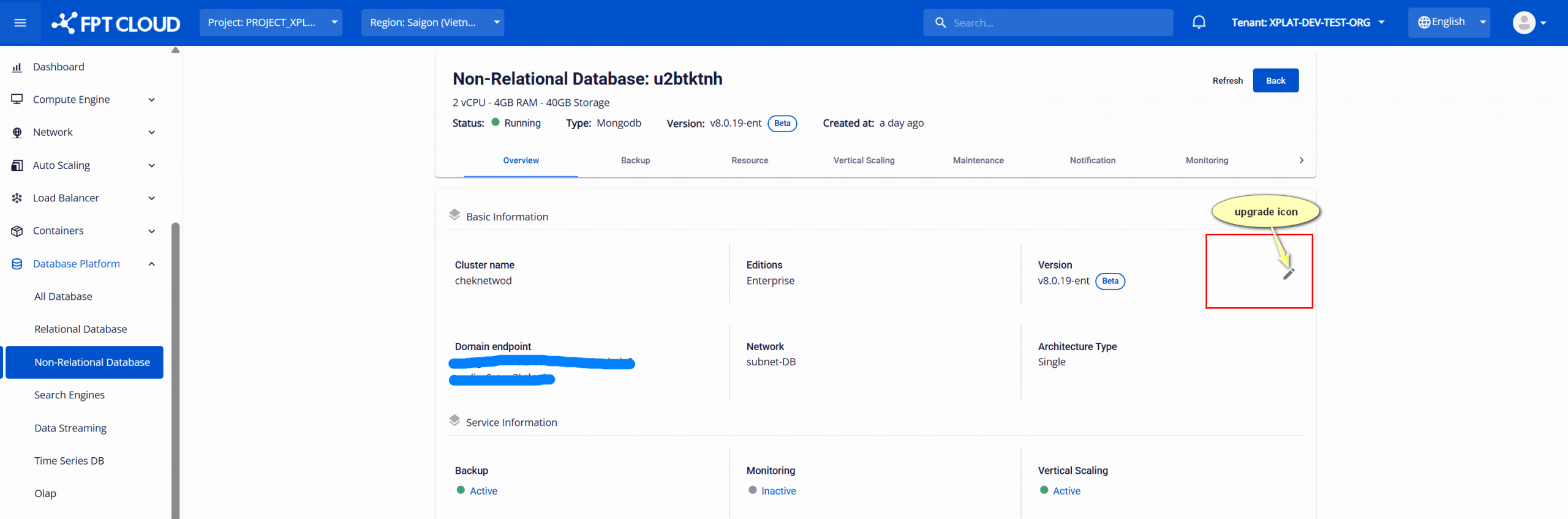
Log in to the FPT Cloud Portal and navigate to Database cluster list. Choose the FPT MongoDB Enterprise cluster that you want to upgrade from your list of clusters. On the cluster’s Overview page, you can see the current version. If this version is not the latest supported patch version, an Upgrade icon will appear next to it to allow for the upgrade.
Step 2: Upgrade version
On the Overview page, click the Upgrade icon next to the version information. A dialog opens showing the current version and the target version(s) available.
Select the target version and enter the confirmation keyword in the input field. Select Upgrade to start the upgrade process.
During the operation, the database cluster status changes to "Updating". Do not attempt to connect or make changes while the update is in progress. The cluster will automatically restart as part of the upgrade.
After the upgrade completes successfully, the status returns to “Running”, and the database cluster is upgraded to the new version.
Important considerations
- Irreversible: Version upgrades cannot be undone; ensure backups are complete.
- Disconnect clients: All application connections must be stopped before upgrading.
- Service impact: The database cluster will be restarted, causing temporary downtime.
- If the upgrade fails, use a backup to restore the previous state.