
- About Us
-
 Secure, unlimited storage to ensures efficiency as well as high and continuous data access demand.
 Virtual server integration for 3D Rendering, AI or ML
 Enhance application capacity and availability.
 Access to an all-inclusive stack for AI development, driven by NVIDIA’s powerful technology!
 FPT Web Application Firewall provides powerful protection for web applications
 Advanced virtual server with rapid scalability
 Backup and restore data instantly, securely and maintain data integrity.
Advanced virtual server with rapid scalability
Access to an all-inclusive stack for AI development, driven by NVIDIA’s powerful technology!
Enhance application capacity and availability.
Backup and restore data instantly, securely and maintain data integrity.
Recovery, ensuring quick operation for the business after all incidents and disasters.
Backup and restore data instantly, securely and maintain data integrity.
Advanced virtual server with rapid scalability
Access to an all-inclusive stack for AI development, driven by NVIDIA’s powerful technology!
Enhance application capacity and availability.
Backup and restore data instantly, securely and maintain data integrity.
Recovery, ensuring quick operation for the business after all incidents and disasters.
 Diverse throughput and capacity to meet various business workloads.
Secure, unlimited storage to ensures efficiency as well as high and continuous data access demand.
FPT Web Application Firewall provides powerful protection for web applications
Intelligent and Comprehensive Virtual Web Application Firewall - Security Collaboration between FPT Cloud and Penta Security.
The Next generation firewall security service
Easily store, manage, deploy, and secure Container images
Safe, secure, stable, high-performance Kubernetes platform
Provided as a service to deploy, monitor, backup, restore, and scale MongoDB databases on cloud.
Provided as a service to deploy, monitor, backup, restore, and scale Redis databases on cloud.
Provided as a service to deploy, monitor, backup, restore, and scale PostgreSQL databases on cloud. System Monitoring Solution anywhere, anytime, anyplatform
 Helps reduce operational costs by up to 40% compared to traditional BI solutions, while improving efficiency through optimized resource usage and infrastructure scaling.
 - Pricing
- Partner
- Event
Managed – FPT Database Engine
-
 Concepts
-
 Initial Setup
-
 Tutorials
-
 Peformance & Benchmark
-
 Troubleshooting
-
 FAQs
FAQs
-
 Glossary
-
View database cluster list
View database cluster list
The Database cluster list page provides a consolidated view of all database instances/clusters running in the FPT Database Engine environment, enabling users to easily monitor status, review configuration, and perform common management operations on each database cluster.
To view the list of database clusters, sign in to the FPT Cloud Portal. From the main menu, select Database Platform > All Databases, or navigate to the menu corresponding to a specific engine category, such as:
- Relational Databases: PostgreSQL, MySQL, MariaDB, Microsoft SQL Server.
- NoSQL: MongoDB, Cassandra, Redis.
- Search Engine: OpenSearch.
- Data Streaming: Kafka.
- Time Series Database: TimescaleDB.
- OLAP: ClickHouse.
The Database cluster list page displays all existing database clusters along with their current status and key information required for monitoring and administration.
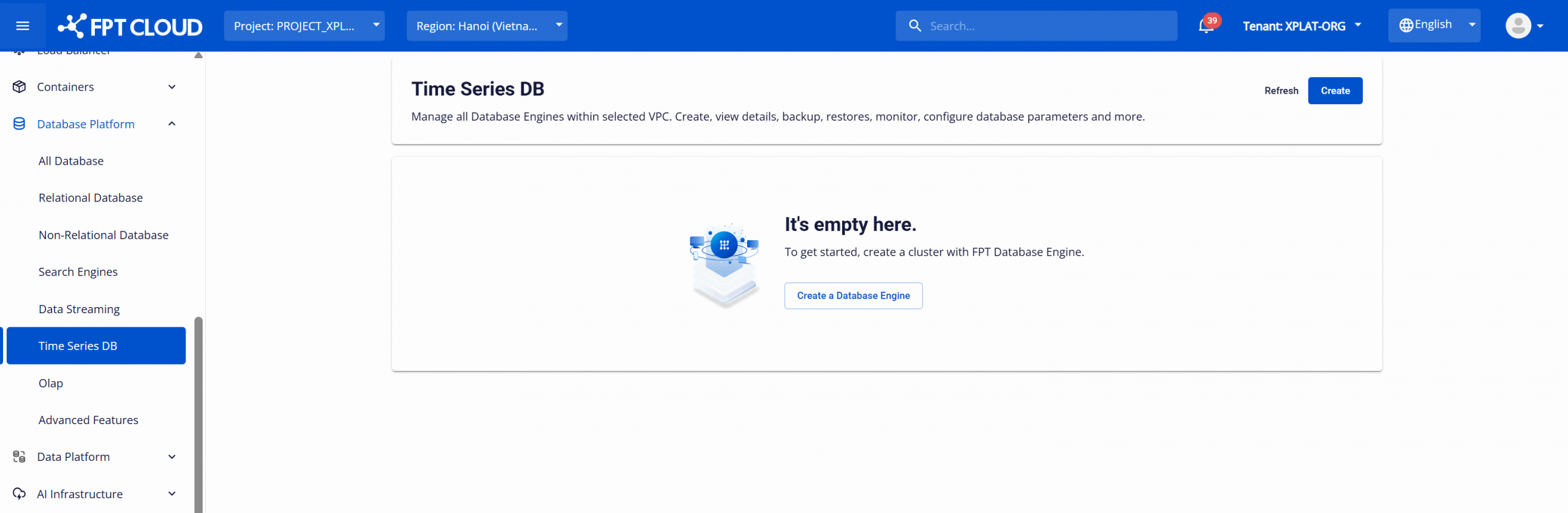
- No database clusters available: The list will be empty and a database cluster provisioning option will be displayed, allowing users to provision a new database cluster.
- Database clusters available: The list shows all database clusters deployed within the VPC, providing high-level details for ongoing management and operations (start/stop/restart/delete).
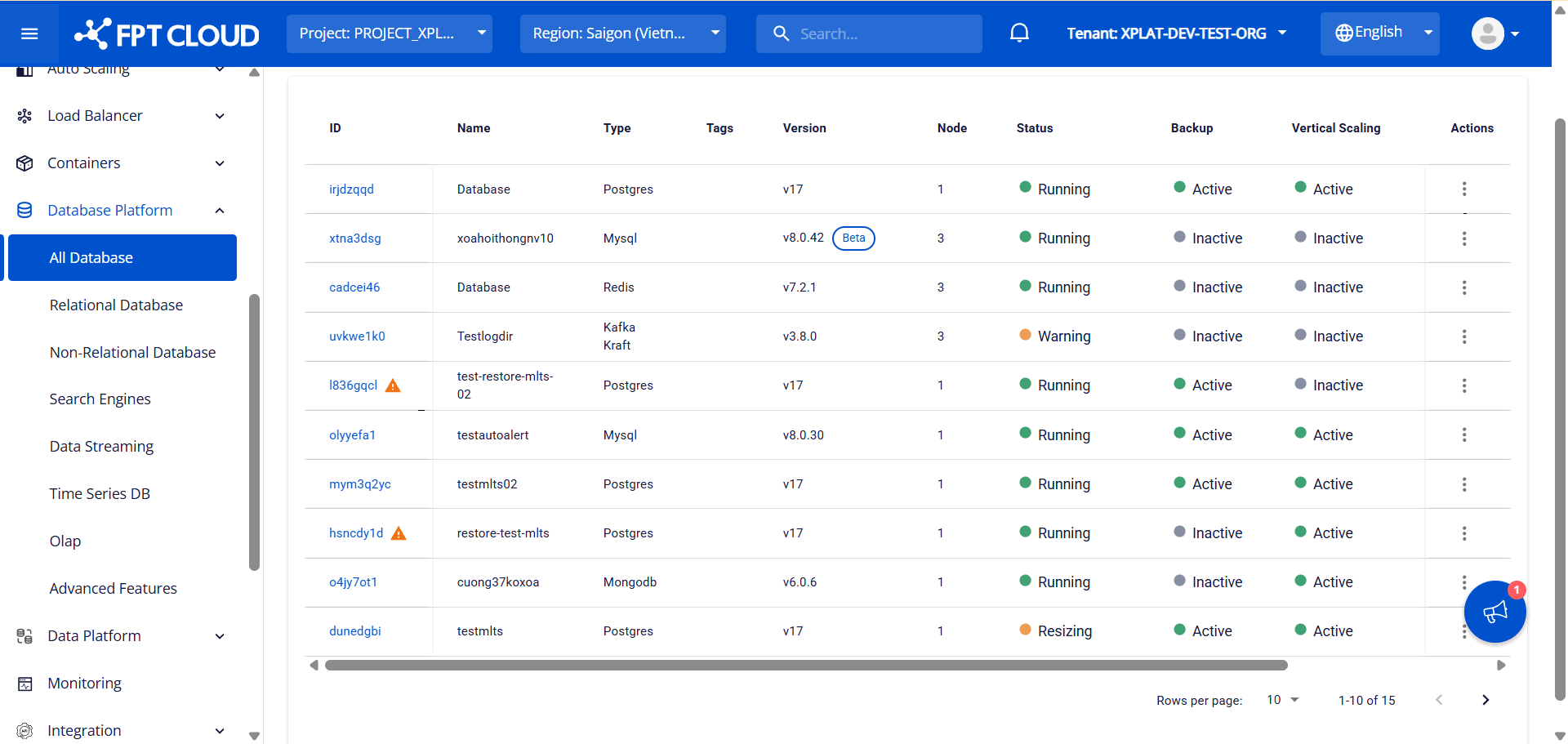
Database cluster list informations:
| Column | Description |
|---|---|
| ID | Displays the database cluster ID.
⚠️
Warning for restarting database clusters:
When the compute resources (CPU/RAM) are adjusted but the database cluster has not yet been restarted to apply the new configuration, the system displays a warning icon. To ensure that the updated configuration takes effect and to maintain optimal performance and cluster stability, users must restart the database cluster. It is recommended to perform the restart during periods of low traffic. Once the restart is completed and the new configuration is successfully applied, the warning icon will no longer be displayed. |
| Name | Displays the database cluster name. |
| Type | Displays the database engine type. |
| Tag | Display a list of tags that have been assigned to the database cluster. |
| Version | Displays the engine version and lifecycle status:
|
| Node | Displays the number of nodes in the database cluster. |
| Status | Displays the current cluster status (Running, Stopped, Warning, ...). |
| Backup | Indicates whether Backup service is enabled. |
| Vertical scaling | Indicates whether Auto Vertical Scaling service is enabled. |
| Monitoring | Indicates whether Monitoring service is enabled. |
| Created at | Displays the database cluster creation timestamp. |
| Action | Displays available actions for the database cluster (Start, Stop, Restart, Delete, Resize, …). |
© 2025 FPT Cloud. All Rights Reserved.