
- About Us
-
 Secure, unlimited storage to ensures efficiency as well as high and continuous data access demand.
 Virtual server integration for 3D Rendering, AI or ML
 Enhance application capacity and availability.
 Access to an all-inclusive stack for AI development, driven by NVIDIA’s powerful technology!
 FPT Web Application Firewall provides powerful protection for web applications
 Advanced virtual server with rapid scalability
 Backup and restore data instantly, securely and maintain data integrity.
Advanced virtual server with rapid scalability
Access to an all-inclusive stack for AI development, driven by NVIDIA’s powerful technology!
Enhance application capacity and availability.
Backup and restore data instantly, securely and maintain data integrity.
Recovery, ensuring quick operation for the business after all incidents and disasters.
Backup and restore data instantly, securely and maintain data integrity.
Advanced virtual server with rapid scalability
Access to an all-inclusive stack for AI development, driven by NVIDIA’s powerful technology!
Enhance application capacity and availability.
Backup and restore data instantly, securely and maintain data integrity.
Recovery, ensuring quick operation for the business after all incidents and disasters.
 Diverse throughput and capacity to meet various business workloads.
Secure, unlimited storage to ensures efficiency as well as high and continuous data access demand.
FPT Web Application Firewall provides powerful protection for web applications
Intelligent and Comprehensive Virtual Web Application Firewall - Security Collaboration between FPT Cloud and Penta Security.
The Next generation firewall security service
Easily store, manage, deploy, and secure Container images
Safe, secure, stable, high-performance Kubernetes platform
Provided as a service to deploy, monitor, backup, restore, and scale MongoDB databases on cloud.
Provided as a service to deploy, monitor, backup, restore, and scale Redis databases on cloud.
Provided as a service to deploy, monitor, backup, restore, and scale PostgreSQL databases on cloud. System Monitoring Solution anywhere, anytime, anyplatform
 Helps reduce operational costs by up to 40% compared to traditional BI solutions, while improving efficiency through optimized resource usage and infrastructure scaling.
 - Pricing
- Partner
- Event
Managed – FPT Database Engine
-
 Concepts
-
 Initial Setup
-
 Tutorials
-
 Peformance & Benchmark
-
 Troubleshooting
-
 FAQs
FAQs
-
 Glossary
-
The Maintenance Window feature allows customers to proactively define a time window for periodic maintenance of their database clusters. During this window, FPT performs system upgrades, patching, and optimization activities.
This feature helps minimize the impact on business operations while improving overall service stability.
Operating rules:
- The maintenance window operates on a weekly basis.
- It is applied per database cluster.
- Each cluster can have only one active maintenance window at a time.
Required permissions:
| Permission | Action Type | Description |
|---|---|---|
| manageDatabase:Configuration | Edit | Allows modifying database cluster configuration such as parameters, and scaling configurations. |
Key capabilities:
- Configure the day and time for periodic maintenance.
- Update the maintenance window during service operation.
- Display upcoming maintenance events.
- Send notifications prior to maintenance activities.
How to configure:
When creating a new database cluster, users can select a maintenance window in the additional service configuration step. The system will apply this configuration from the first operational cycle. For details, refer to Provision Database section.
During use, users can update the maintenance window by following these steps:
Step 1: Access the maintenance window configuration
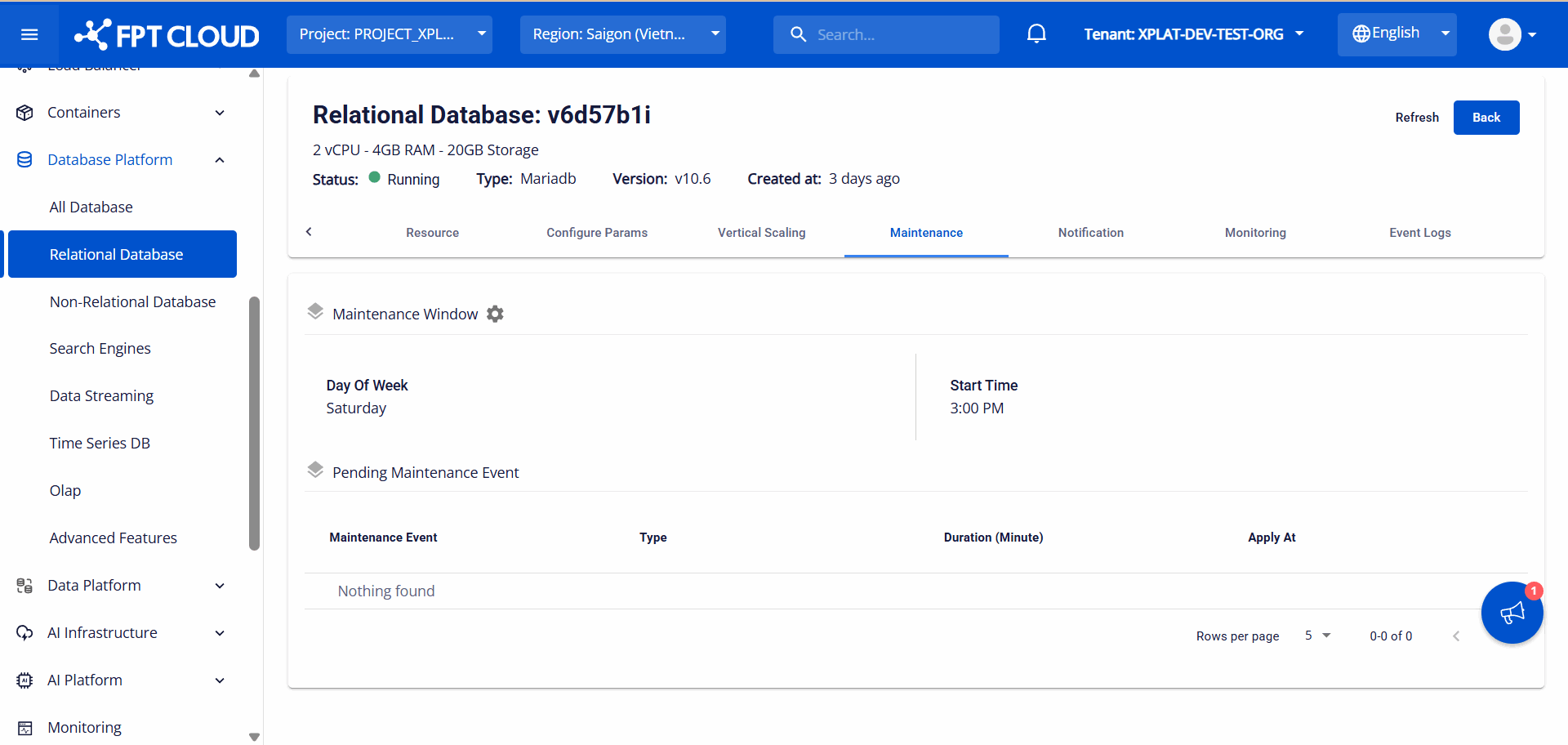
Log in to the FPT Cloud Portal. From the main menu, select Database Platform → All Database. On the database list page, select the Cluster ID you want to configure. Open the Maintenance tab to access the maintenance window management screen.
Step 2: Configure the maintenance window
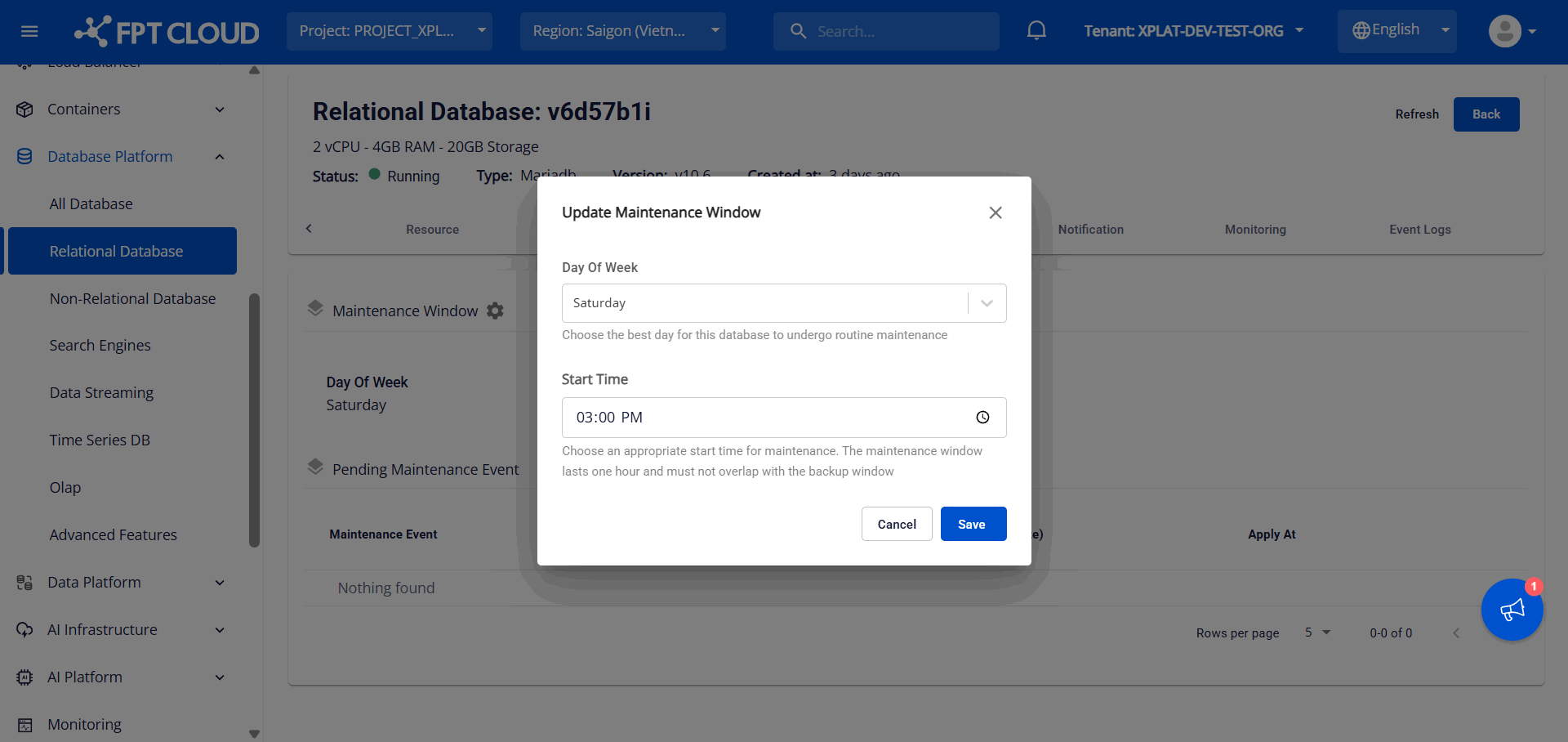
On the Maintenance tab, click the Configuration icon (gear icon next to Maintenance Window) to open the Update Maintenance Window dialog:
Enter the following information:
- Day of Week: The day of the week on which maintenance is performed. Available options range from “Monday” to “Sunday”.
- Start Time: the time at which maintenance is allowed to start on the selected day. Maintenance duration: 1 hour, starting from the configured start time.
Click Save to apply the changes. The system will apply the configuration for subsequent maintenance sessions.
Note: You can update the maintenance window only if the database cluster does not already have a scheduled maintenance event.
Step 3: View upcoming maintenance events
Scheduled maintenance activities are displayed in the “Pending Maintenance Event” section. The following information is provided:
- Maintenance Event: Name of the maintenance event.
- Type: Type of maintenance.
- Duration (Minute): Estimated maintenance duration in minutes.
- Apply At: Scheduled start time of the maintenance.
Users are encouraged to regularly review the maintenance schedule to plan operations accordingly and minimize service impact.
The system sends email notifications prior to maintenance activities. Currently, two notification milestones are supported:
- 7 days before the scheduled maintenance.
- 1 day before the maintenance begins.
To configure the list of email recipients, navigate to the Notification tab and update the settings for the maintenance service. For more information, refer to Notification section.