
- About Us
-
 Secure, unlimited storage to ensures efficiency as well as high and continuous data access demand.
 Virtual server integration for 3D Rendering, AI or ML
 Enhance application capacity and availability.
 Access to an all-inclusive stack for AI development, driven by NVIDIA’s powerful technology!
 FPT Web Application Firewall provides powerful protection for web applications
 Advanced virtual server with rapid scalability
 Backup and restore data instantly, securely and maintain data integrity.
Advanced virtual server with rapid scalability
Access to an all-inclusive stack for AI development, driven by NVIDIA’s powerful technology!
Enhance application capacity and availability.
Backup and restore data instantly, securely and maintain data integrity.
Recovery, ensuring quick operation for the business after all incidents and disasters.
Backup and restore data instantly, securely and maintain data integrity.
Advanced virtual server with rapid scalability
Access to an all-inclusive stack for AI development, driven by NVIDIA’s powerful technology!
Enhance application capacity and availability.
Backup and restore data instantly, securely and maintain data integrity.
Recovery, ensuring quick operation for the business after all incidents and disasters.
 Diverse throughput and capacity to meet various business workloads.
Secure, unlimited storage to ensures efficiency as well as high and continuous data access demand.
FPT Web Application Firewall provides powerful protection for web applications
Intelligent and Comprehensive Virtual Web Application Firewall - Security Collaboration between FPT Cloud and Penta Security.
The Next generation firewall security service
Easily store, manage, deploy, and secure Container images
Safe, secure, stable, high-performance Kubernetes platform
Provided as a service to deploy, monitor, backup, restore, and scale MongoDB databases on cloud.
Provided as a service to deploy, monitor, backup, restore, and scale Redis databases on cloud.
Provided as a service to deploy, monitor, backup, restore, and scale PostgreSQL databases on cloud. System Monitoring Solution anywhere, anytime, anyplatform
 Helps reduce operational costs by up to 40% compared to traditional BI solutions, while improving efficiency through optimized resource usage and infrastructure scaling.
 - Pricing
- Partner
- Event
Managed – FPT Database Engine
-
 Concepts
-
 Initial Setup
-
 Tutorials
-
 Peformance & Benchmark
-
 Troubleshooting
-
 FAQs
FAQs
-
 Glossary
-
The Restore and Point-in-Time Recovery (PITR) features allow users to recover a database cluster from existing backups or restore a database cluster to a specific point in time in the past. This section provides detailed instructions to help users perform data recovery accurately, safely, and efficiently, while ensuring data integrity.
When performing Restore or PITR, the system will create a new database cluster and will not overwrite the existing cluster.
Currently, FPT Cloud supports Restore for all available database engines and supports PITR for PostgreSQL.
1. Restore database cluster
The restore feature allows users to use a previously created backup to recover data and create a new database cluster. This is useful in cases of data loss, system failures, or when a rollback to a previous state is required.
Before performing a restore, ensure the database cluster has at least one successfully created backup (restore point) - meaning at least one restore point is available.
Steps to perform restore:
Step 1: Access the Restore screen
From the menu, select Database Platform → choose All Database or the relevant database engine group → click the Cluster ID of the database cluster to restore → select the Backup tab → choose the Restore sub-tab. The system displays a list of Available Restore Points, including backup types (full backup or different backup):
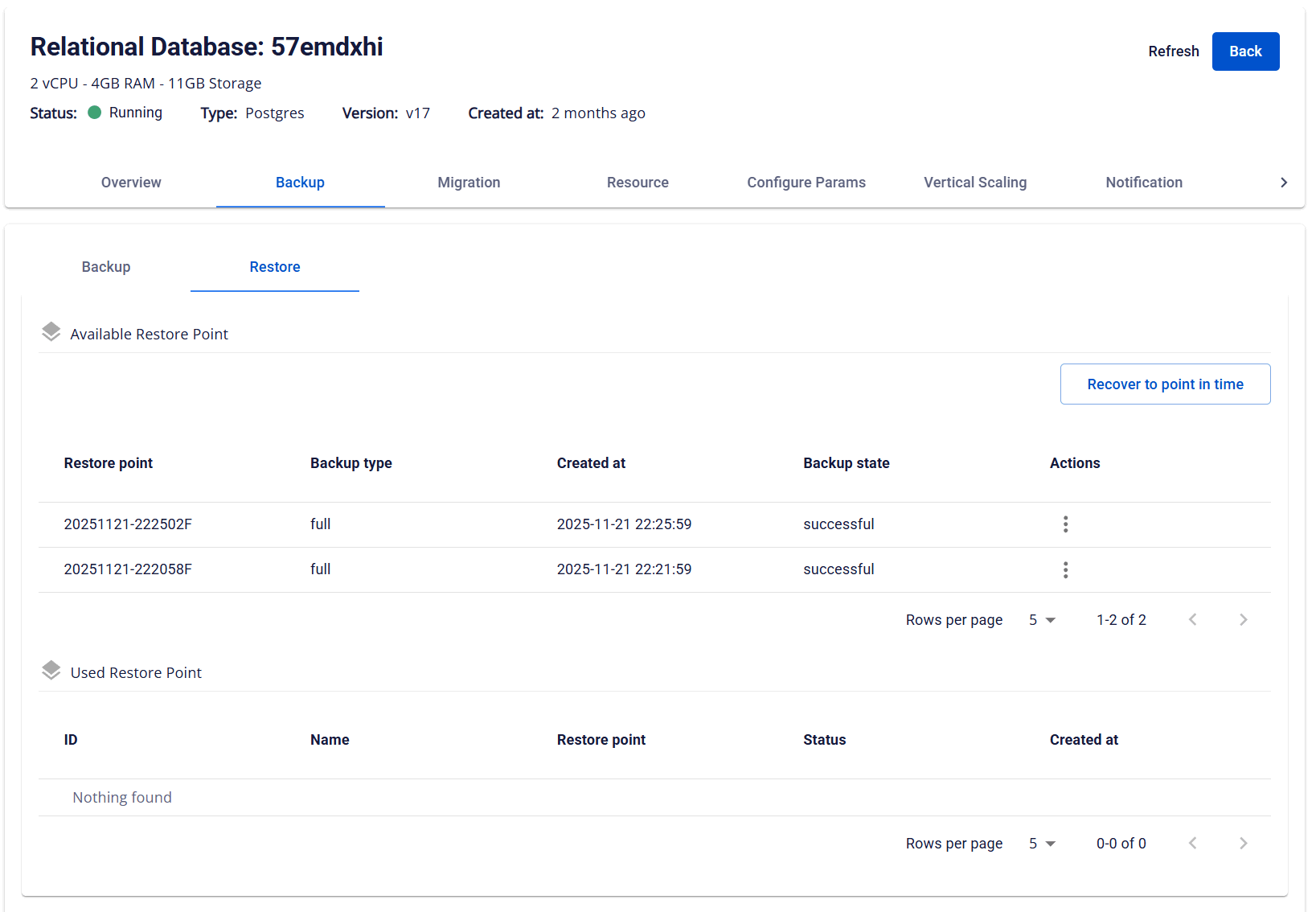
Step 2: Perform restore
In the Actions column, click the ellipsis icon (⋮) corresponding to the desired restore point > select Restore. The Restore Database dialog appears:
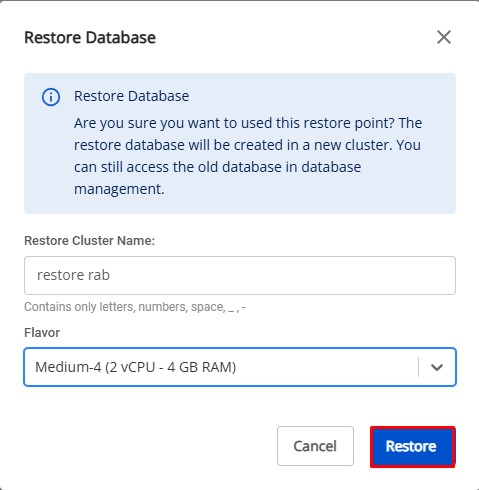
Enter the required information:
- Restore Cluster Name: Enter a name for the restored cluster.
- Flavor: Select an appropriate configuration for the restored cluster.
Click Restore to start the recovery process. Upon successful restore, a new database cluster will appear in the database cluster list containing data from the selected backup.
2. Recover to Point-in-Time
The Recover to Point-in-Time feature allows users to restore a database cluster to an exact point in the past, which is especially useful when recovering from incidents or operational errors.
Currently, this feature is supported only for PostgreSQL, MySQL and MariaDB.
Before performing PITR, ensure that:
- PITR is enabled for the database cluster.
- At least one full backup exists
- Required archived logs are available for recovery.
Steps to perform recover to Point-in-Time:
Step 1: Access the recovery screen
Follow the same steps as accessing the restore screen in the 1. Restore database cluster section.
Step 2: Perform recover
On the Restore tab, click the Restore to point in time button > The Restore Database to a Point in Time popup appears:
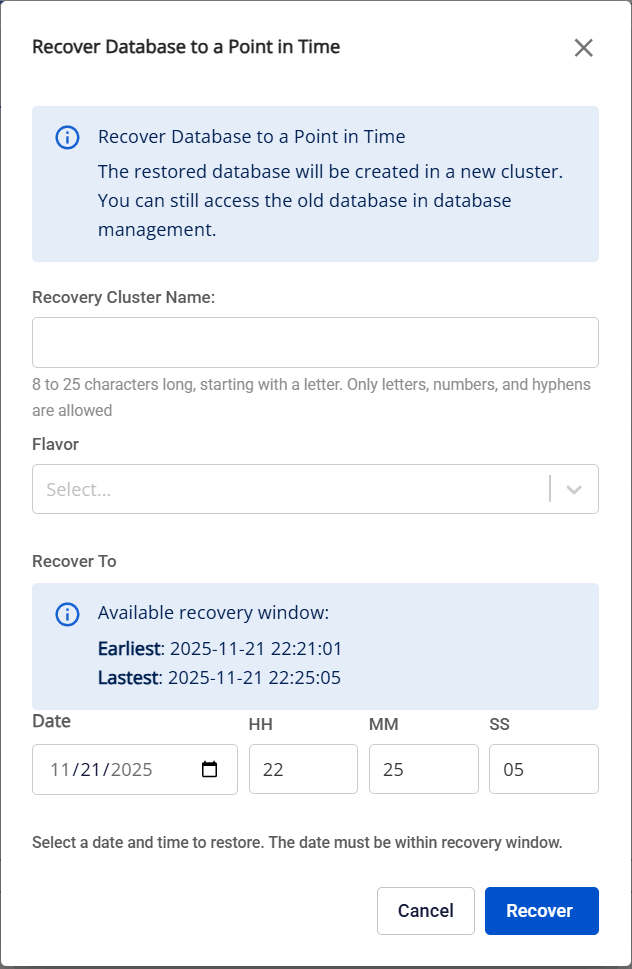
Enter the required information:
- Restore Cluster Name: Enter a name for the restored cluster.
- Flavor: Select an appropriate configuration for the restored cluster.
- Recover To: Select the exact time to which you want to restore the database cluster (in date-time format).
Click Recover to start the recovery process. The system will create a new cluster and restore data to the specified point in time. Upon successful recovery, a new cluster will appear in the database cluster list screen containing data at the recovery time.
Note: You can only recover data to points in time after the first full backup has been created since PITR was enabled. If this full backup has not yet been executed, the PITR feature will not be available. Any data changes that occurred before this full backup point are not protected by PITR and cannot be recovered.