
- About Us
-
 Secure, unlimited storage to ensures efficiency as well as high and continuous data access demand.
 Virtual server integration for 3D Rendering, AI or ML
 Enhance application capacity and availability.
 Access to an all-inclusive stack for AI development, driven by NVIDIA’s powerful technology!
 FPT Web Application Firewall provides powerful protection for web applications
 Advanced virtual server with rapid scalability
 Backup and restore data instantly, securely and maintain data integrity.
Advanced virtual server with rapid scalability
Access to an all-inclusive stack for AI development, driven by NVIDIA’s powerful technology!
Enhance application capacity and availability.
Backup and restore data instantly, securely and maintain data integrity.
Recovery, ensuring quick operation for the business after all incidents and disasters.
Backup and restore data instantly, securely and maintain data integrity.
Advanced virtual server with rapid scalability
Access to an all-inclusive stack for AI development, driven by NVIDIA’s powerful technology!
Enhance application capacity and availability.
Backup and restore data instantly, securely and maintain data integrity.
Recovery, ensuring quick operation for the business after all incidents and disasters.
 Diverse throughput and capacity to meet various business workloads.
Secure, unlimited storage to ensures efficiency as well as high and continuous data access demand.
FPT Web Application Firewall provides powerful protection for web applications
Intelligent and Comprehensive Virtual Web Application Firewall - Security Collaboration between FPT Cloud and Penta Security.
The Next generation firewall security service
Easily store, manage, deploy, and secure Container images
Safe, secure, stable, high-performance Kubernetes platform
Provided as a service to deploy, monitor, backup, restore, and scale MongoDB databases on cloud.
Provided as a service to deploy, monitor, backup, restore, and scale Redis databases on cloud.
Provided as a service to deploy, monitor, backup, restore, and scale PostgreSQL databases on cloud. System Monitoring Solution anywhere, anytime, anyplatform
 Helps reduce operational costs by up to 40% compared to traditional BI solutions, while improving efficiency through optimized resource usage and infrastructure scaling.
 - Pricing
- Partner
- Event
Managed – FPT Database Engine
-
 Concepts
-
 Initial Setup
-
 Tutorials
-
 Peformance & Benchmark
-
 Troubleshooting
-
 FAQs
FAQs
-
 Glossary
-
The database cluster operations guide explains how to manage database clusters on FPT Cloud Portal. You can perform start, stop, restart, and delete actions according to cluster lifecycle states.
Operational actions
- Start: Starts a database cluster that is in the "Stopped" state. The cluster status changes to “Starting”, and then to “Running” when it becomes available.
- Stop: Stops a database cluster that is in the "Running" state. When stopped, the cluster temporarily suspends workload processing. The status changes to “Stopping” and then to “Stopped”. In this state, the database cluster does not serve requests but can be started again when needed.
- Restart: Restarts a running database cluster. This operation stops and then starts the cluster, and is typically used to apply configuration changes or resolve transient issues. The status shows “Restarting” and returns to “Running” when the operation completes.
- Delete: Deletes a database cluster and all associated data. This action is irreversible. Once completed, the cluster is removed from the list and all related resources are released.
Action availability by database cluster status
| Status | Meaning | Actions available |
|---|---|---|
| Running | The database cluster is provisioning. | Delete |
| Running | The database cluster is operating normally. | Stop, Restart, Delete |
| Stopped | The database cluster is stopped. | Start, Delete |
| Warning | The database cluster is experiencing degraded performance or stability. | Delete |
| Failed | The database cluster encountered an unknown error. If the database cluster is no longer needed, delete it to clean up resources, or contact FPT Support for assistance. | Delete |
Perform an operation
To perform operational actions, open the database cluster list page, then select the “⋯” (More actions) icon in the “Action” column for the target database cluster. The list of available actions is displayed:
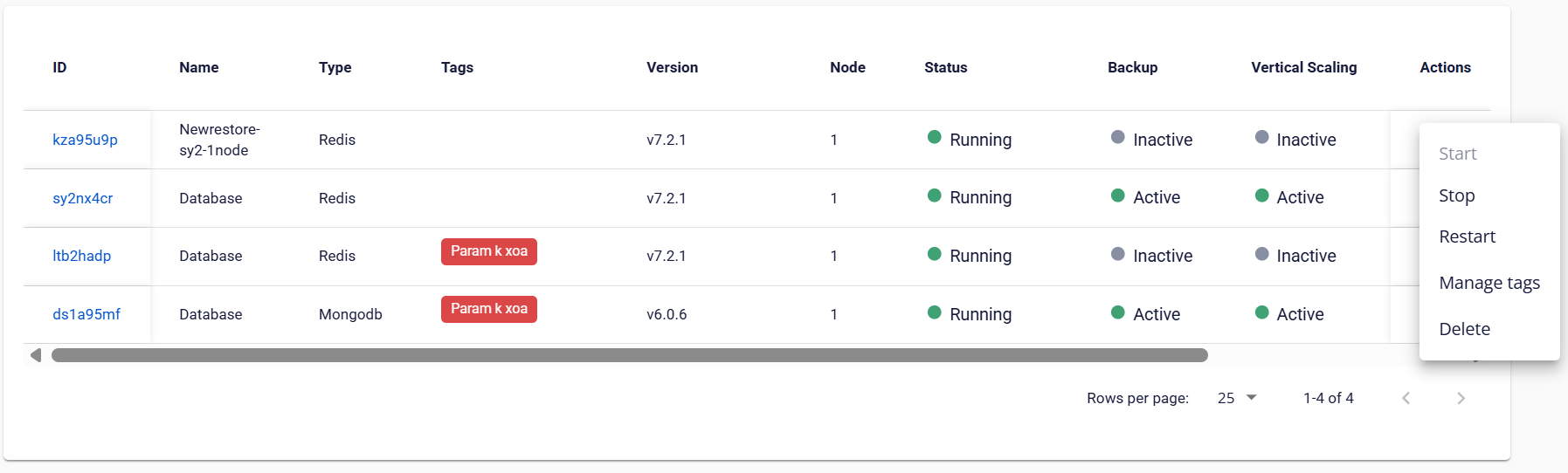
When you select an action, a confirmation dialog appears. You must explicitly confirm the action to proceed, to prevent unintended changes, especially for irreversible operations.
After confirmation, the system performs the action, which typically takes 5–7 minutes. During this time, additional operations on the database cluster are temporarily disabled until the process completes.